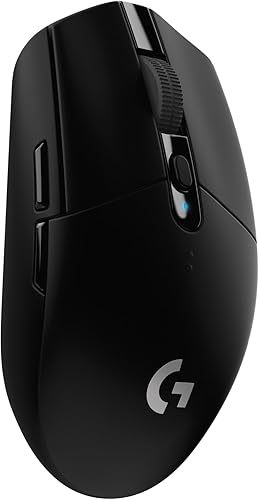
Logitech G502 Hero Wired Gaming Mouse - Black | High performance, 25,600 DPI, RGB, adjustable weights, 11 programmable buttons, on-board memory, PC/Mac
Logitech

Logitech G502 Hero Wired Gaming Mouse - Black | High performance, 25,600 DPI, RGB, adjustable weights, 11 programmable buttons, on-board memory, PC/Mac

Logitech · ASIN: B07GBZ4Q68

No Amazon ratings captured for this listing yet.

$28.15
In Stock
Free Returns
Secure Purchase
Amazon Verified

Key Features

  • HERO Gaming Sensor: Next generation HERO mouse sensor delivers precision tracking up to 25600 DPI with zero smoothing, filtering or acceleration
  • 11 programmable buttons and dual mode hyper-fast scroll wheel: The Logitech wired gaming mouse gives you fully customizable control over your gameplay
  • Adjustable weights: Match your playing style. Arrange up to five 3.6 g weights for a personalized weight and balance configuration
  • LIGHTSYNC technology: Logitech G LIGHTSYNC technology provides fully customizable RGB lighting that can also synchronize with your gaming (requires Logitech Gaming Software)
  • Mechanical Switch Button Tensioning: A metal spring tensioning system and metal pivot hinges are built into left and right computer gaming mouse buttons for a crisp, clean click feel with rapid click feedback
  • Next gen sensor : Capable of detecting movements at the sub-micron level, can track movement less than one millionth of a meter with pinpoint accuracy

About This Product

Logitech updated its iconic G502 gaming mouse to deliver even higher performance and more precise functionality than ever. The G502 Hero high Performance Gaming mouse is a top choice as a best rated gaming mouse, features the next generation Hero 16K Optical sensor, the highest performing and most efficient gaming sensor Logitech has ever made. An all-new lens and an updated tracking algorithm deliver ultra-precise tracking with no acceleration, smoothing, or filtering over the entire DPI range. This ergonomic gaming mouse allows you to customize RGB mouse lighting to match your style and environment or sync to other Logitech G products. No matter your gaming style, it works well for gamers looking for a gaming mouse with side buttons. It's easy to tweak G502 Hero to match your requirements, suitable for custom profiles for your games, adjustable sensitivity from 200 up to 16,000 DPI, and a tunable weight system for tuning and balancing of up to five 3.6G weights for just the right balance and feel.

Product Details

Brand
Logitech
Model
910-005469
Color
Black
Dimensions
‎1.57 x 2.95 x 5.2 inches
Weight
4.32 ounces
Manufacturer
Logitech
Date First Available
‎August 24, 2018
ASIN
B07GBZ4Q68

Customer Reviews Summary

If you talk about this mouse, you really need to talk about the Logitech software, There are 3 different downloads at the Logitech website to change your 5 profile settings if you don't like the default settings on the G502. The one they will suggest first is G HUB and it is by far the worst and most convoluted to learn to setup and use. The second which they are phasing out is Logitech Gaming Software. (If you install both G HUB and Logitech Gaming Software, and you try to use Logitech Gaming Software, it will not allow you to use it, and it will tell you to use G HUB instead even though many FAQ's at the Logitech website still refer to Logitech Gaming Software.) However, the third, and the one you should download and use, is called Onboard Memory Manager. It is very simple and easy to figure out, does almost everything you want it to, and it doesn't also install a lot of other crap on your system.NOTE: If you do wind up installing G HUB or Logitech Gaming Software, the setting DPI LIGHTING for "ALWAYS ON" is unchecked by default and is not in Onboard Memory Manager. (By default, when you change profiles, the side DPI lights on the G502 briefly go on and then go off to indicate what profile you are on.) I suspect this setting is unchecked by default for a reason, because I could not get it to work properly when set to "ALWAYS ON". When this option is checked the side DPI lights would not stay on the proper profile indicator to indicate the current profile setting, and they would randomly change (such as when I used the scroll wheel.) What I did was to keep this setting in G HUB or Logitech Gaming Software unchecked. Then in Onboard Memory Manager I would select a fixed color for each profile so I would always know what profile I was currently on. (BTW, this is similar to what is on the wireless G305 mouse but they are only small dots of color, you can't change the default colors, and they only select up to 5 different DPI settings on only one available onboard profile as opposed to the 5 profiles each with 5 DPI settings on the G502.)Unless you have a desire to be frustrated, do yourself a favor and just download Onboard Memory Manager. On the G502, the only reason I can see for using G HUB or Logitech Gaming Software is if you want to change settings for mouse click one or two, which Onboard Memory Manager won't allow, or if you want to setup profiles for individual games and software on your computer, in which case I would lean in favor of Logitech Gaming Software which is much more intuitive and easy to use.All that being said, once you get past setting the G502 up, the mouse performance is outstanding. I didn't add the weights since the mouse felt fine to me. And even though the highest default DPI setting is at 6400, you can set it all the way up to 25,600 if you wish. Also, I have small hands, and even though some of the buttons I will never be able to push without really reaching, it's very comfortable using for long periods of time, and for the current price you can't beat it.

Logitech G502 Hero Wired Gaming Mouse - Black — $28.15 at Amazon | The Deals Home