Logitech Pebble Keys 2 K380s vs AULA 99 Key Keyboard
Price, rating, features and specifications side by side. Prices are captured from Amazon and go stale — check the listing before buying.
Selected Products (2/4)
Logitech Pebble Keys 2 K380s, Multi-Device Bluetooth Wireless Keyboard with Customizable Shortcuts, Slim and Portable, Easy-Switch for Windows, macOS, iPadOS, Android, Chrome OS - Tonal Graphite
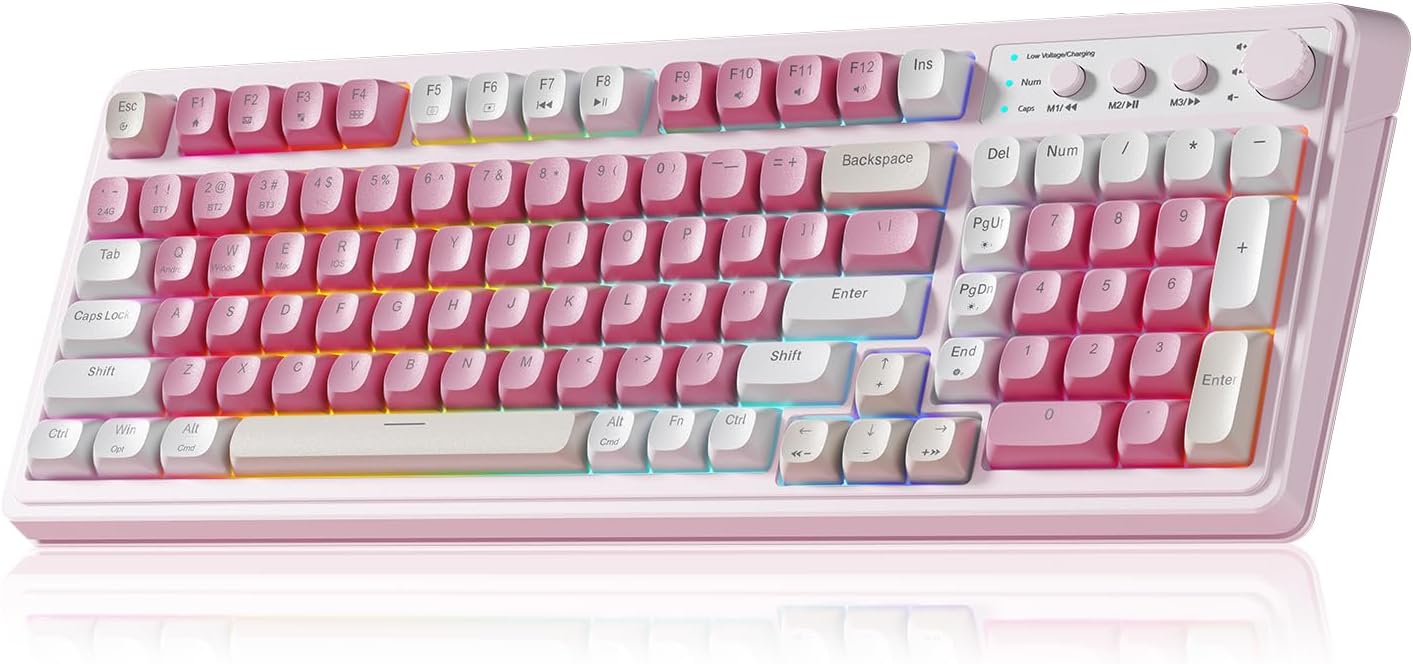
AULA 99 Key Keyboard, Wireless Pink Gaming Keyboard Creamy with Number Pad
Product
Logitech Pebble Keys 2 K380s, Multi-Device Bluetooth Wireless Keyboard with Customizable Shortcuts, Slim and Portable, Easy-Switch for Windows, macOS, iPadOS, Android, Chrome OS - Tonal Graphite
AULA 99 Key Keyboard, Wireless Pink Gaming Keyboard Creamy with Number Pad
Price
$49.00$59.99
$33.24Best Price$34.99
Rating
4.5
Highest Rated
4.2
Reviews
3,845Most Popular
2,146
Category
video games
video games
Key Features
Defy Boring: With a slim design, multiple colors and smarter tech, this Bluetooth keyboard from the Pebble 2 Collection lets you express your vibe and make your statement
Never Made Ordinary, Made to go places: the Pebble Keys 2 K380s keyboard is slim, compact, portable and made with recycled plastic (1)
Easily Hop Across 3 Devices: Use Bluetooth to connect up to 3 wireless devices across OSs (Windows, macOS, iPadOS, ChromeOS), and switch between them with one click of the Easy-Switch buttons
Save Time: Get instant access to search, screen capture, the emoji menu and more with Fn shortcut keys; personalize the 10 Fn keys with Logi Options plus app (2) so you can do things your way
Feel-Good Typing at Your Fingertips: The Pebble Keys 2 K380s Quiet Keyboard comes with scooped round keys and a familiar, laptop-like typing experience for effortless, comfy typing
Gaming Keyboard: All keys on this wireless keyboard support macro customization, which allows you to record and edit macros to program a series of complex actions into a key, useful in very exciting real-time games.Enjoy the fascination of technology and a new experience with the pink membrane keyboard.
RGB Backlit Cool Keyboard: This LED keyboard features 16.8 million RGB light color, with 16 pre-set lighting effects to add a great atmosphere to the game(FN+End can switch backlit colour effect). Lighting brightness and speed can be adjusted by the knob or the FN+key combination. With Macro soft, you can create unique lighting setup to make your rgb keyboard more interesting and create a personalized work gaming environment.
Keyboards 99-Key: Knob Design- Adjust volume, connection mode, backlit brightness/speed, RGB mode/color, all it takes is just a twist or a click.
Bluetooth Keyboard: Multi-Device Connection: AULA light up Keyboard offers 3-connectivity modes including Bluetooth 5.0, 2.4GHz wireless and USB wired mode, you can switch flexibly to suit different scenes. Bluetooth keyboard is equipped with dual-mode rotary knob for easy adjustment of volume, audio and lighting effects.
AULA S99 Keyboard:AULA ergonomic Keyboard features a foldable 2-stage kickstand, allows you to choose the tilt angle that best suits you for a better keying posture.Aula membrane keyboard offers 3 buttons - M1/M2/M3 allowing you to remap key functions or merge multiple keys into a single key.This aula s99 cute keyboard compatible with WinXP/7/8/10,MAC,Android and iOS(If your computer is ANDROID system,you need to point FN+Q before using this keyboard,FN+R means for iOS system,and FN+E means for MAC system).Please NOTE: AULA S99 is a membrane keyboard not mechanical keyboard and this doesn't support hot-swapping,it can't changed switches.
Product Dimensions
10.98 x 4.88 x 0.63 inches
Item Weight
14.6 ounces
Batteries
2 AAA batteries required. (included)
Item Model Number
920-011775
Date First Available
September 6, 2023
Manufacturer
Logitech
AULA
Asin
B0BT4DP7SC
B0F8VYDRDP
Best Sellers Rank
#16 in Computer Keyboards
#29 in Video Games (See Top 100 in Video Games) #1 in PC Gaming Keyboards
Customer Reviews
4.5 4.5 out of 5 stars
(3,845)
var dpAcrHasRegisteredArcLinkClickAction;
P.when('A', 'ready').execute(function(A) {
if (dpAcrHasRegisteredArcLinkClickAction !== true) {
dpAcrHasRegisteredArcLinkClickAction = true;
A.declarative(
'acrLink-click-metrics', 'click',
{ "allowLinkDefault": true },
function (event) {
if (window.ue) {
ue.count("acrLinkClickCount", (ue.count("acrLinkClickCount") || 0) + 1);
}
}
);
}
});
P.when('A', 'cf').execute(function(A) {
A.declarative('acrStarsLink-click-metrics', 'click', { "allowLinkDefault" : true }, function(event){
if(window.ue) {
ue.count("acrStarsLinkWithPopoverClickCount", (ue.count("acrStarsLinkWithPopoverClickCount") || 0) + 1);
}
});
});
4.5 out of 5 stars
4.2 4.2 out of 5 stars
(2,146)
var dpAcrHasRegisteredArcLinkClickAction;
P.when('A', 'ready').execute(function(A) {
if (dpAcrHasRegisteredArcLinkClickAction !== true) {
dpAcrHasRegisteredArcLinkClickAction = true;
A.declarative(
'acrLink-click-metrics', 'click',
{ "allowLinkDefault": true },
function (event) {
if (window.ue) {
ue.count("acrLinkClickCount", (ue.count("acrLinkClickCount") || 0) + 1);
}
}
);
}
});
P.when('A', 'cf').execute(function(A) {
A.declarative('acrStarsLink-click-metrics', 'click', { "allowLinkDefault" : true }, function(event){
if(window.ue) {
ue.count("acrStarsLinkWithPopoverClickCount", (ue.count("acrStarsLinkWithPopoverClickCount") || 0) + 1);
}
});
});
4.2 out of 5 stars
Power Source
Battery Powered
Battery Powered
Operating System
10, 11 or later 10 Customize the device by installing the Logi Options+ App for Windows or macOS at logi.com/optionsplus