
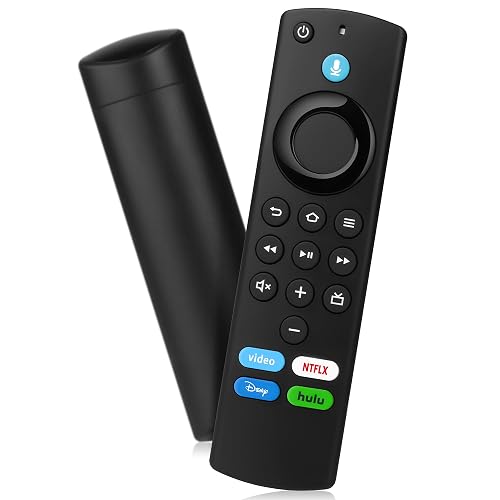
Voice Remote Replacement fit for Fire Smart TV Stick(4K,4K Max,Lite),TVs Cube (1st/ 2nd/3rd Gen),Remote for Toshiba,Pioneer,Omni,QLED,3rd Gen Smart TV
Doombusy · ASIN: B0GG9CMWKN
Key Features
- APPLICABLE STREAMING DEVICE MODELS:Replacement Remote Control Compatible with Smart TVs (3rd Gen),Smart TVs Stick 4K (1st / 2nd Gen),Smart TVs Stick 4K Max (1st / 2nd Gen),Smart TVs Stick (2nd / 3rd Gen)
- COMPATIBLE REMOTE MODELS: Remote Control Compatible with Smart TV Remote Control Models : NS-RCFNA-21, CT-95018, CT-RC1US-21, NS-RCFNA-19,CT-RC1US-19 and Compatible for Amz Omni Series Smart TV etc
- FOR APPLICABLE TV SERIES: Replacement Remote Control Compatible with Toshiba TV Models: LF711 / LF621U / LF421U / LF221U / C350 / A810U / A710U / M550 / V35 series.Replacement Remote control Compatible with Insignia Smart TV Model: F30 / F20 / F50 / DF710 / DF711 / DF310 / DF510 / DF311 / DF620 series. Also for AMZ Smart TV 4-Series Omni Series QLED Series, and more
- VOICE FUNCTION: Use the voice function to directly find any content you want, such as weather forecast, music, movies, etc. 4 Shortcut Keys for quick access to your favorite content
- HOW TO PAIR: Press the Home button for about 10-15 seconds, when the LED blinks, the remote control enters the auto pairing state and lasts for 10-30 seconds, after pairing is completed, the indicator light goes out
About This Product
Replacement Voice Remote How to pair your TV stick?If this is a replacement remote and you don't have the original remote that came with your TV device:1. Restart the TV equipment. When the main screen of TV appears, the remote control can be used. If not, please move to step 2.2. Press and hold the Home button on the new remote control for at least 10 seconds, until the LED starts to flash quickly, and then send the loosening. At this time, enter the pairing mode, indicating that your remote control has been successfully paired.If you do have the remote that came with your TV device, you'll need both remotes for setup:1. On your new remote, press and hold the Home button for 10 seconds. The indicator LED will slowly fash amber for 10 seconds, then flash faster when your remote is ready to connect.Compatible with TV Models :for Smart TV Stick 4Kfor Smart TV Stick Litefor Smart TV Stick 4K Maxfor Smart TV Stick (2nd Gen)for Smart TV Stick (3rd Gen)for Smart TV Cube (1st Gen)for Smart TV Cube (2nd Gen)for Smart TV (3rd Gen, Pendant Design)for Smart TV Stick 4K BundleCompatible with Remote Models : for Smart TV Stick Lite for Smart TV (2nd Gen)for Smart TV (1st Gen)for TV Edition smart TVs
Product Details
- Brand
- Doombusy
- Color
- Black
- Manufacturer
- Doombusy
- Country of Origin
- China
- ASIN
- B0GG9CMWKN
Customer Reviews Summary
I dropped and broke my firestick remote. This new one was super easy to pair and it works great. It can even turn the TV on and off and change the volume, something the old remote could not. Comes with good instructions. So yes, great buy! I might get one for my other firestick too.
Related Products
Replacement Remote Control for Fire-Smart-TV Cube,TV Stick(2nd/3rd Gen/4K/Lite/4K Max/),for Smart TV (3rd Gen/Cube),Not for Samsung/Roku TV

Amazon Basics 20-Pack AA Alkaline High-Performance Batteries, 1.5 Volt, 10-Year Shelf Life

Amazon Basics 4 Units Pack 9 Volt Performance All-Purpose Alkaline Batteries, 5-Year Shelf Life, Easy to Open Value Package
