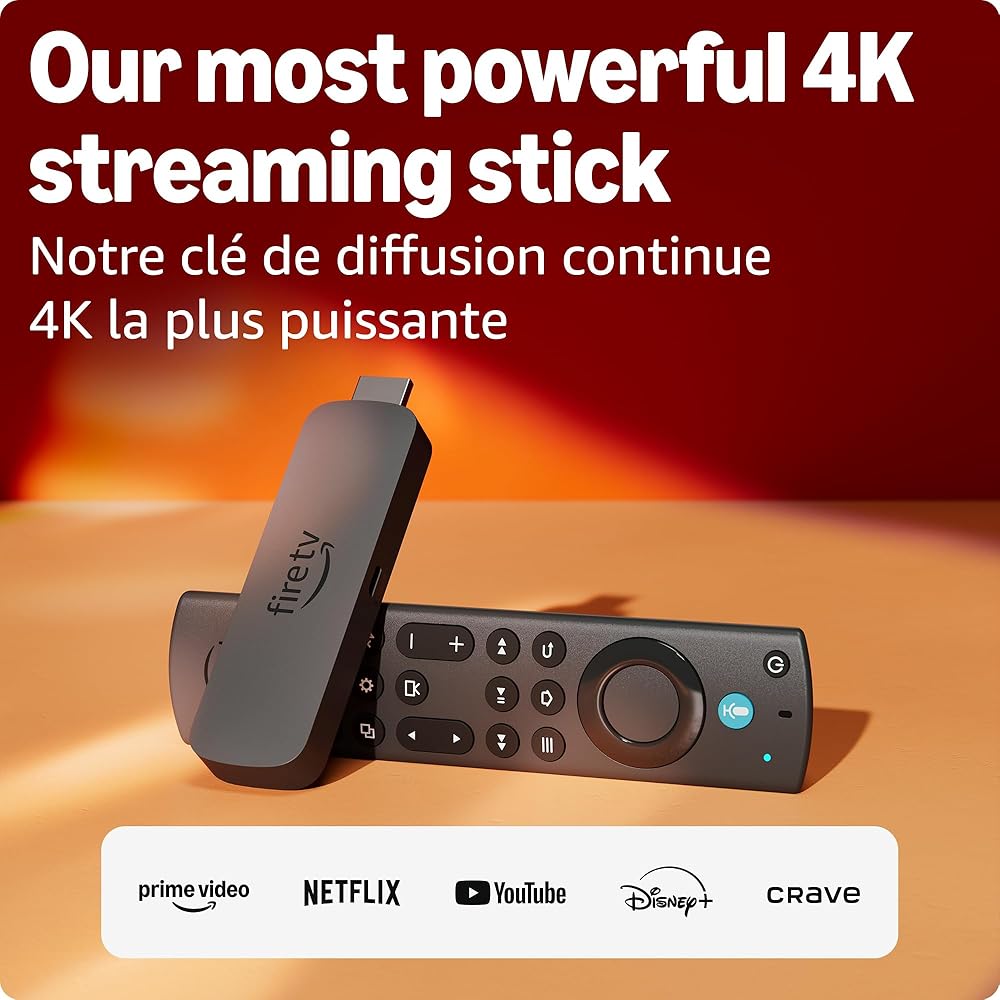
Amazon Fire TV
Amazon Fire TV Stick 4K Max (newest model), streaming device, supports Wi-Fi 6E, free & live TV without cable or satellite, find shows faster with Alexa+
Amazon Fire TV · ASIN: B0BXM37848
4.5 out of 5 stars on Amazon(13,333 ratings)
$129.99
In Stock
As an Amazon Associate we earn from qualifying purchases. Learn more
Key Features
- Elevate your entertainment experience with a powerful processor for lightning-fast app starts and fluid navigation.
- Play Xbox games – Stream Call of Duty: Black Ops 7, Hogwarts Legacy, Outer Worlds 2, Ninja Gaiden 4, and hundreds of games on your Fire TV Stick 4K Max with Xbox Game Pass via cloud gaming. Xbox Game Pass subscription and compatible controller required. Each sold separately.
- Enjoy the show in 4K Ultra HD, with support for Dolby Vision, HDR10+, and immersive Dolby Atmos audio.
- Enjoy smoother 4K streaming with Wi-Fi 6E support, even when other devices are connected to your router.
- Fire TV Ambient Experience lets you display over 2,000 pieces of museum-quality art and photography.
- Find shows faster with Alexa+ – Getting to what you love has never been easier. Talk naturally to find what to watch fast, view Amazon Photos, manage your smart home, or dive into virtually any topic.
- Fire TV Stick 4K Max has 16GB of storage—double that of Fire TV Stick 4K Plus and our other streaming sticks, for even more apps, games and downloads.
- Stream hundreds of thousands of movies and TV episodes. Watch favourites from Netflix, Prime Video, Disney+, Crave, and more, plus listen to millions of songs. Subscription fees may apply.
- Control your TV and connected devices with an upgraded remote that includes voice control, a recents button, and dedicated channel buttons to surf live TV.
- The newest Fire TV experience (2026) – Our biggest update to Fire TV has a new, modern design that gets you to your entertainment fast. Browse dedicated content categories, pin more of your favorite apps, and get personalized recommendations from Alexa+. Spend less time scrolling, and more time watching.
Product Details
- Brand
- Amazon Fire TV
- Manufacturer
- Amazon Fire TV
- Warranty
- <img src="https://m.media-amazon.com/images/S/amazon-avatars-global/a77ecfba-0894-4837-ac18-b34e727398d8._CR0%2C0%2C500%2C500_SX460_SX48_.jpg"/>Derek5 out of 5 starsWhy the Amazon Firestick 4K MAX is the Upgrade You Need | From Struggling to Streaming Heaven!Reviewed in Canada on July 17, 2025Configuration: Fire TV Stick 4K MaxVerified PurchaseBrief content visible, double tap to read full content.Full content visible, double tap to read brief content.No spoken audioVideo Player is loading.PlayCurrent Time 0:00/Duration 1:24Loaded: 7.15%0:00Stream Type LIVESeek to live, currently behind liveLIVERemaining Time -1:24 1xPlayback RateChaptersChaptersDescriptionsdescriptions off, selectedCaptionscaptions settings, opens captions settings dialogcaptions offen, selectedAudio Trackdefault, selectedFullscreenMuteThis is a modal window.Beginning of dialog window. Escape will cancel and close the window.TextColorWhiteBlackRedGreenBlueYellowMagentaCyanTransparencyOpaqueSemi-TransparentBackgroundColorBlackWhiteRedGreenBlueYellowMagentaCyanTransparencyOpaqueSemi-TransparentTransparentWindowColorBlackWhiteRedGreenBlueYellowMagentaCyanTransparencyTransparentSemi-TransparentOpaqueFont Size50%75%100%125%150%175%200%300%400%Text Edge StyleNoneRaisedDepressedUniformDropshadowFont FamilyProportional Sans-SerifMonospace Sans-SerifProportional SerifMonospace SerifCasualScriptSmall CapsReset restore all settings to the default valuesDoneClose Modal DialogEnd of dialog window.𝐌𝐲 𝐑𝐞𝐯𝐢𝐞𝐰 𝐨𝐟 𝐭𝐡𝐞 𝐀𝐦𝐚𝐳𝐨𝐧 𝐅𝐢𝐫𝐞𝐬𝐭𝐢𝐜𝐤 𝟒𝐊 𝐌𝐀𝐗Let me start by saying this is an 𝐚𝐦𝐚𝐳𝐢𝐧𝐠 𝐩𝐢𝐞𝐜𝐞 𝐨𝐟 𝐭𝐞𝐜𝐡𝐧𝐨𝐥𝐨𝐠𝐲!𝐌𝐲 𝐄𝐱𝐩𝐞𝐫𝐢𝐞𝐧𝐜𝐞 𝐖𝐢𝐭𝐡 𝐚𝐧𝐝 𝐖𝐢𝐭𝐡𝐨𝐮𝐭 𝐈𝐭:Before I had the Firestick, my experience was quite miserable—let me explain. I own a 4K TV, but it's what I’d call a semi-smart TV. It only had three apps: YouTube, Netflix, and Twitter. I mean, it gets the job done, but I couldn’t add anything else. So, if I wanted to watch a movie, I’d have to plug in my PC, grab the mouse, to finally watch my movie. Honestly, it was pretty tiresome... Sure, Netflix worked fine, but I’m primarily a Plex user!Fast forward to now, and my experience with the Firestick has been completely different. Here’s why:First off, the Firestick is always plugged in, so I no longer have to connect my PC each time. I can download multiple apps, especially Plex (a total game-changer for me!). Plus, the remote works with both my TV and the Firestick (volume, power, etc.). No more hassle with the mouse just to watch a damn movie!𝐓𝐡𝐞 𝐏𝐚𝐜𝐤𝐚𝐠𝐢𝐧𝐠:I have to give Amazon credit for how eco-friendly the packaging is. The box is made of cardboard, everything inside is held in place with cardboard too, and even the protective layers for the remote, Firestick, and power block are made of recyclable white paper. Well done, Amazon!𝐖𝐡𝐚𝐭’𝐬 𝐈𝐧𝐬𝐢𝐝𝐞 𝐭𝐡𝐞 𝐁𝐨𝐱:• Firestick 4K MAX• Remote with Alexa built-in• HDMI extension cable (Female to Male)• Power cable (USB-A to Micro USB)• Power cube• 2x AAA batteries for the remote• Instruction manual𝐓𝐡𝐞 𝐈𝐧𝐬𝐭𝐚𝐥𝐥𝐚𝐭𝐢𝐨𝐧:Setting up the Firestick is incredibly easy. Here’s the process:1. Unbox everything.2. Install the HDMI extension if necessary.3. Connect the Micro USB cable to the Firestick and the USB-A end to the power cube.4. Plug the Firestick into an HDMI port on your TV.5. Install the AAA batteries into the remote.6. Power on the Firestick with the remote.7. Follow the on-screen instructions to set it up:• Link the Firestick to your Amazon account• Enter your Wi-Fi password• Select your TV brand (if the Firestick doesn't detect it automatically, which is rare).That’s it! Quick, painless, and you're good to go.𝐃𝐢𝐟𝐟𝐞𝐫𝐞𝐧𝐜𝐞𝐬 𝐁𝐞𝐭𝐰𝐞𝐞𝐧 𝐀𝐥𝐥 𝐭𝐡𝐞 𝐅𝐢𝐫𝐞𝐬𝐭𝐢𝐜𝐤𝐬 (𝐏𝐫𝐢𝐜𝐞𝐬 𝐢𝐧 𝐂𝐀𝐃): • 𝐅𝐢𝐫𝐞𝐬𝐭𝐢𝐜𝐤 𝐇𝐃1080p, 8GB storage, 1GB RAM, Wi-Fi 5, Bluetooth 5.0 LENo Dolby Vision support, Only Amazon Luna cloud gamingCPU: 4x ARM Cortex-A53 @1.7GHzAndroid 9 / Fire OS 7Price: \$49.99• 𝐅𝐢𝐫𝐞𝐬𝐭𝐢𝐜𝐤 𝟒𝐊4K, 8GB storage, 2GB RAM, Wi-Fi 6, Bluetooth 5.2CPU: 4x ARM Cortex-A55 @1.7GHzAndroid 11 / Fire OS 8Price: \$69.99• 𝐅𝐢𝐫𝐞𝐬𝐭𝐢𝐜𝐤 𝟒𝐊 𝐌𝐚𝐱4K, 16GB storage, 2GB RAM, Wi-Fi 6E, Bluetooth 5.2CPU: 4x ARM Cortex-A55 @2.0GHzAndroid 11 / Fire OS 8Price: \$79.99• 𝐅𝐢𝐫𝐞𝐬𝐭𝐢𝐜𝐤 𝐂𝐮𝐛𝐞4K, 16GB storage, 2GB RAM, Wi-Fi 6E, Ethernet port, Bluetooth 5.0 LECPU: 4x ARM Cortex-A73 @2.2 GHz + 4x ARM Cortex-A53 @2.0 GHzAndroid 9 / Fire OS 7Price: \$189.99𝐏𝐫𝐨𝐬 • Affordable for what it offers, and often discounted• Huge library of apps• Wi-Fi 6E support• HDR 10+ and Dolby Vision Atmos support𝐂𝐨𝐧𝐬: • Ethernet adapter supports only 100Mbps (not included)• Remote battery cover isn’t very secure• Slightly bloated dashboard (mostly an issue with older models like Firestick HD)𝐃𝐞𝐭𝐚𝐢𝐥𝐞𝐝 𝐒𝐩𝐞𝐜𝐬: • Wi-Fi: Wi-Fi 6E tri-band (2.4GHz, 5GHz, 6GHz)• Resolution: 4K Ultra HD• Storage: 16GB• HDR: HDR10+, Dolby Vision Atmos• CPU: 2.0 GHz Quad-Core• GPU: 850 MHz• RAM: 2GB• Bluetooth: Bluetooth 5.2 + BLE• Android Version / Fire OS: Android 11 / Fire OS 8• Cloud Gaming: Xbox Game Pass / Amazon Luna• Size: 99mm x 30mm x 14mm (device only), 108mm x 30mm x 14mm (with connector)• Weight: 43.5g• 1-year limited warranty𝐑𝐞𝐦𝐨𝐭𝐞: • Voice Support: Alexa built-in• Size: 38mm x 157mm x 17mm• Weight: 51g (without batteries)• Technology: Bluetooth and Infrared• Compatibility: Fire TV Stick 4K Max (2nd Gen), Fire TV 2-Series, Fire TV 4-Series, Fire TV Omni Series, Fire TV Cube (3rd Gen)Happy Movies!Read moreRead less<img src="https://m.media-amazon.com/images/S/amazon-avatars-global/a77ecfba-0894-4837-ac18-b34e727398d8._CR0%2C0%2C500%2C500_SX460_SX48_.jpg"/>Derek5 out of 5 starsWhy the Amazon Firestick 4K MAX is the Upgrade You Need | From Struggling to Streaming Heaven!Reviewed in Canada on July 17, 2025Configuration: Fire TV Stick 4K MaxVerified Purchase𝐌𝐲 𝐑𝐞𝐯𝐢𝐞𝐰 𝐨𝐟 𝐭𝐡𝐞 𝐀𝐦𝐚𝐳𝐨𝐧 𝐅𝐢𝐫𝐞𝐬𝐭𝐢𝐜𝐤 𝟒𝐊 𝐌𝐀𝐗Let me start by saying this is an 𝐚𝐦𝐚𝐳𝐢𝐧𝐠 𝐩𝐢𝐞𝐜𝐞 𝐨𝐟 𝐭𝐞𝐜𝐡𝐧𝐨𝐥𝐨𝐠𝐲!𝐌𝐲 𝐄𝐱𝐩𝐞𝐫𝐢𝐞𝐧𝐜𝐞 𝐖𝐢𝐭𝐡 𝐚𝐧𝐝 𝐖𝐢𝐭𝐡𝐨𝐮𝐭 𝐈𝐭:Before I had the Firestick, my experience was quite miserable—let me explain. I own a 4K TV, but it's what I’d call a semi-smart TV. It only had three apps: YouTube, Netflix, and Twitter. I mean, it gets the job done, but I couldn’t add anything else. So, if I wanted to watch a movie, I’d have to plug in my PC, grab the mouse, to finally watch my movie. Honestly, it was pretty tiresome... Sure, Netflix worked fine, but I’m primarily a Plex user!Fast forward to now, and my experience with the Firestick has been completely different. Here’s why:First off, the Firestick is always plugged in, so I no longer have to connect my PC each time. I can download multiple apps, especially Plex (a total game-changer for me!). Plus, the remote works with both my TV and the Firestick (volume, power, etc.). No more hassle with the mouse just to watch a damn movie!𝐓𝐡𝐞 𝐏𝐚𝐜𝐤𝐚𝐠𝐢𝐧𝐠:I have to give Amazon credit for how eco-friendly the packaging is. The box is made of cardboard, everything inside is held in place with cardboard too, and even the protective layers for the remote, Firestick, and power block are made of recyclable white paper. Well done, Amazon!𝐖𝐡𝐚𝐭’𝐬 𝐈𝐧𝐬𝐢𝐝𝐞 𝐭𝐡𝐞 𝐁𝐨𝐱:• Firestick 4K MAX• Remote with Alexa built-in• HDMI extension cable (Female to Male)• Power cable (USB-A to Micro USB)• Power cube• 2x AAA batteries for the remote• Instruction manual𝐓𝐡𝐞 𝐈𝐧𝐬𝐭𝐚𝐥𝐥𝐚𝐭𝐢𝐨𝐧:Setting up the Firestick is incredibly easy. Here’s the process:1. Unbox everything.2. Install the HDMI extension if necessary.3. Connect the Micro USB cable to the Firestick and the USB-A end to the power cube.4. Plug the Firestick into an HDMI port on your TV.5. Install the AAA batteries into the remote.6. Power on the Firestick with the remote.7. Follow the on-screen instructions to set it up:• Link the Firestick to your Amazon account• Enter your Wi-Fi password• Select your TV brand (if the Firestick doesn't detect it automatically, which is rare).That’s it! Quick, painless, and you're good to go.𝐃𝐢𝐟𝐟𝐞𝐫𝐞𝐧𝐜𝐞𝐬 𝐁𝐞𝐭𝐰𝐞𝐞𝐧 𝐀𝐥𝐥 𝐭𝐡𝐞 𝐅𝐢𝐫𝐞𝐬𝐭𝐢𝐜𝐤𝐬 (𝐏𝐫𝐢𝐜𝐞𝐬 𝐢𝐧 𝐂𝐀𝐃): • 𝐅𝐢𝐫𝐞𝐬𝐭𝐢𝐜𝐤 𝐇𝐃1080p, 8GB storage, 1GB RAM, Wi-Fi 5, Bluetooth 5.0 LENo Dolby Vision support, Only Amazon Luna cloud gamingCPU: 4x ARM Cortex-A53 @1.7GHzAndroid 9 / Fire OS 7Price: \$49.99• 𝐅𝐢𝐫𝐞𝐬𝐭𝐢𝐜𝐤 𝟒𝐊4K, 8GB storage, 2GB RAM, Wi-Fi 6, Bluetooth 5.2CPU: 4x ARM Cortex-A55 @1.7GHzAndroid 11 / Fire OS 8Price: \$69.99• 𝐅𝐢𝐫𝐞𝐬𝐭𝐢𝐜𝐤 𝟒𝐊 𝐌𝐚𝐱4K, 16GB storage, 2GB RAM, Wi-Fi 6E, Bluetooth 5.2CPU: 4x ARM Cortex-A55 @2.0GHzAndroid 11 / Fire OS 8Price: \$79.99• 𝐅𝐢𝐫𝐞𝐬𝐭𝐢𝐜𝐤 𝐂𝐮𝐛𝐞4K, 16GB storage, 2GB RAM, Wi-Fi 6E, Ethernet port, Bluetooth 5.0 LECPU: 4x ARM Cortex-A73 @2.2 GHz + 4x ARM Cortex-A53 @2.0 GHzAndroid 9 / Fire OS 7Price: \$189.99𝐏𝐫𝐨𝐬 • Affordable for what it offers, and often discounted• Huge library of apps• Wi-Fi 6E support• HDR 10+ and Dolby Vision Atmos support𝐂𝐨𝐧𝐬: • Ethernet adapter supports only 100Mbps (not included)• Remote battery cover isn’t very secure• Slightly bloated dashboard (mostly an issue with older models like Firestick HD)𝐃𝐞𝐭𝐚𝐢𝐥𝐞𝐝 𝐒𝐩𝐞𝐜𝐬: • Wi-Fi: Wi-Fi 6E tri-band (2.4GHz, 5GHz, 6GHz)• Resolution: 4K Ultra HD• Storage: 16GB• HDR: HDR10+, Dolby Vision Atmos• CPU: 2.0 GHz Quad-Core• GPU: 850 MHz• RAM: 2GB• Bluetooth: Bluetooth 5.2 + BLE• Android Version / Fire OS: Android 11 / Fire OS 8• Cloud Gaming: Xbox Game Pass / Amazon Luna• Size: 99mm x 30mm x 14mm (device only), 108mm x 30mm x 14mm (with connector)• Weight: 43.5g• Warranty: 1-year limited warranty𝐑𝐞𝐦𝐨𝐭𝐞: • Voice Support: Alexa built-in• Size: 38mm x 157mm x 17mm• Weight: 51g (without batteries)• Technology: Bluetooth and Infrared• Compatibility: Fire TV Stick 4K Max (2nd Gen), Fire TV 2-Series, Fire TV 4-Series, Fire TV Omni Series, Fire TV Cube (3rd Gen)Happy Movies!32 people found this helpfulHelpfulSending feedback...Thank you for your feedback.Sorry, we failed to record your vote. Please try againReportSending feedback...Thanks, we’ll investigate in the next few days.Sorry, We failed to report this review. Please try again• Warranty: 1-year limited warranty• Warranty: 1-year limited warranty
- ASIN
- B0BXM37848
Related Products

Amazon Fire TV Stick 4K Plus, streaming device, hundreds of thousands of movies and TV episodes, supports Wi-Fi 6, watch free & live TV, find shows faster with Alexa+
4.5 out of 5 stars on Amazon(2,071 ratings)
$99.99

Amazon Fire TV Stick HD (newest model), free & live TV, Alexa Voice Remote, powered by the TV, effortless setup, find shows faster with Alexa+
4.0 out of 5 stars on Amazon(1,287 ratings)
$69.99


Seagate Portable 2TB External Hard Drive Portable HDD – USB 3.0 for PC, Mac, Playstation, & Xbox - 1-Year Rescue Service (STGX2000400)
4.6 out of 5 stars on Amazon(267,355 ratings)
$179.99